WonderSift

Category: Internet Culture

The stories, claims, communities, and strange moments moving through online life.

  • Meet Weathergotchi, the Tiny E-Paper Climate Pet

    Meet Weathergotchi, the Tiny E-Paper Climate Pet

    There is a small face on Michael Manning’s desk that can look delighted, alarmed, chilly, or thoroughly unimpressed by the room. Give it a pleasant temperature and it smiles. Let the air wander toward an extreme and the expression changes. It is a charming bit of theater from a device with the wonderfully awkward name Weathergotchi.

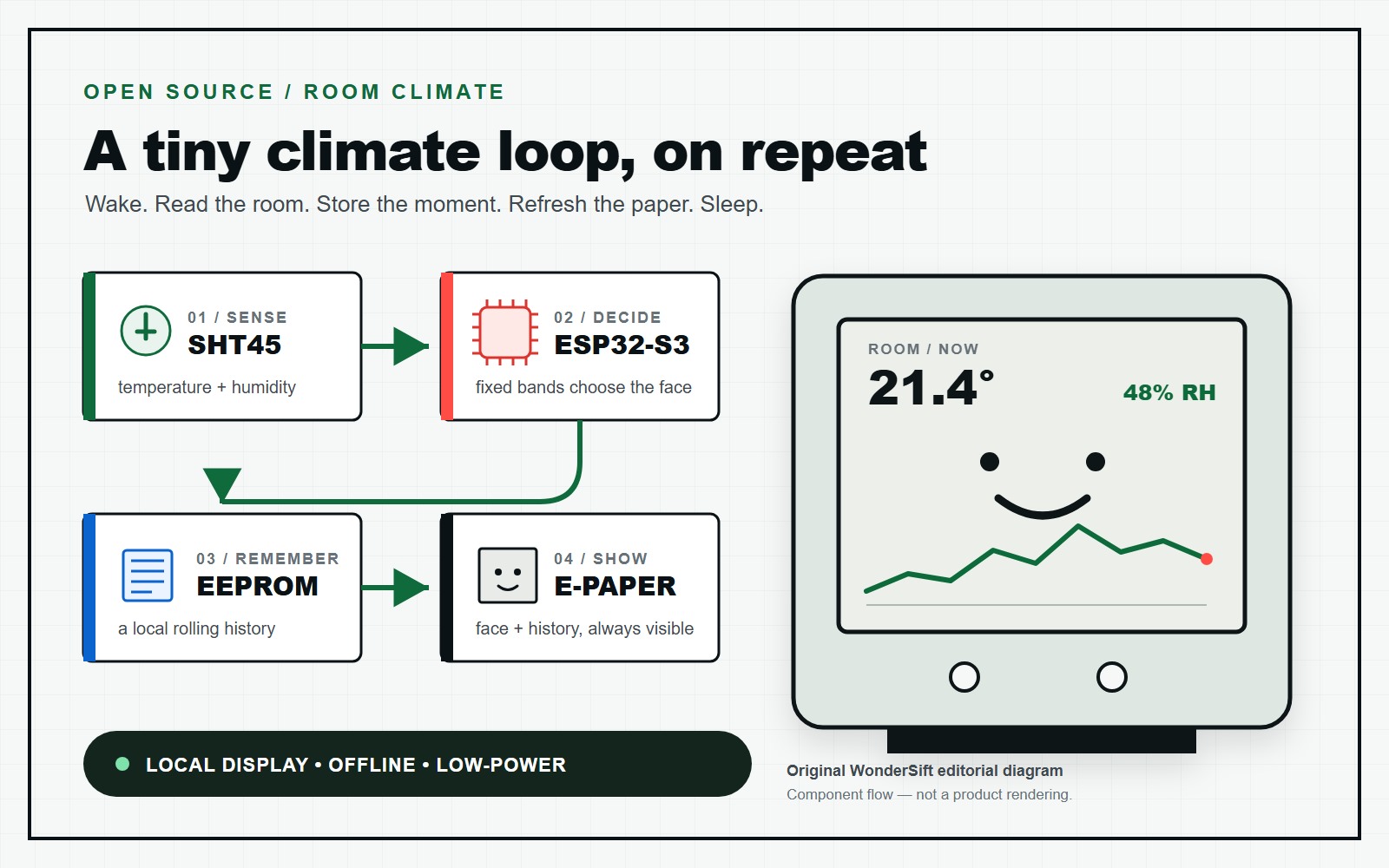
    The trick is refreshingly honest: fixed temperature thresholds choose the face. Weathergotchi is not AI, does not learn anyone’s habits, and does not fetch a forecast. It measures the conditions immediately around it, records them locally, and gives those numbers a little personality.

    A room sensor with comic timing

    Most climate monitors communicate like tiny accountants: 22.4 degrees, 48 percent humidity, next question. Weathergotchi keeps the numbers but adds an expressive shortcut. The current firmware walks through a series of Celsius comparisons, selecting a bitmap face for cold, comfortable, warm, or hot conditions. The character is a readable gauge, not a claim that the box has feelings.

    The screen also shows humidity, time, battery status, and recent history. Buttons let a curious owner page through older readings and switch views, while settings cover Celsius or Fahrenheit, 12- or 24-hour time, graph range, refresh interval, and a night-screen mode. Because e-paper holds an image without continuous power, the face can remain visible while the processor rests.

    That combination is the appeal. A number tells you the room is warm; a tiny overheated expression catches your eye from across the desk. It makes invisible drift—an afternoon sunbeam, a stuffy meeting, a heater working overtime—feel like an event.

    What happens between blinks

    Under the printed enclosure is a serious maker project. A Sensirion SHT45 measures temperature and relative humidity. An ESP32-S3 microcontroller coordinates the reading, interface, and display. A 24LC512 EEPROM keeps the log when power is removed, while a DS3231 real-time clock maintains time and can wake the processor. A BQ27441 fuel gauge watches the battery. Manning designed a custom circuit board and published the printable case files alongside the firmware and schematics.

    In normal use, the clock wakes the ESP32-S3 at an interval, and the firmware takes a climate reading immediately. It logs the result, refreshes what needs refreshing on the e-paper panel, and returns to low-power sleep. The quick reading matters: the microcontroller itself produces heat while active, so lingering in menus or holding the case can temporarily nudge the sensor away from the room’s true ambient temperature.

    Manning’s design target is more than one week on a small lithium-polymer battery. WonderSift has not tested that runtime, and processor documentation alone cannot prove it. The project gets there conceptually by making wakeful moments brief and letting the ESP32-S3 spend most of its life asleep.

    The missing cloud is the feature

    The ESP32 family is famous for wireless networking, yet this version deliberately offers no Wi-Fi or Bluetooth data export. History stays in the device’s memory and is reviewed on its screen. That makes it less convenient for spreadsheets and remote alerts, but wonderfully uncomplicated as an object: no app, account, subscription, server, or dashboard competing with the little face.

    It also gives Weathergotchi a coherent purpose. This is not a miniature weather station predicting rain across town. It is an ambient-condition logger for the patch of air surrounding it. Place it near a plant, on a bedroom shelf, or beside a drafty window and it becomes a quiet record of that specific spot.

    The offline choice has a practical battery benefit, but it also changes the mood. The gadget is there to be glanced at, not managed. Its recent-history graph supplies context without turning your room into another cloud dataset.

    Still a prototype—and that is part of the fun

    Weathergotchi is an open-source build, not a finished appliance with a warranty and a calibration certificate. The repository includes firmware, board design, schematics, and enclosure files, but assembly involves a custom board and small components. Its sensor has impressive manufacturer specifications; that does not mean the complete homemade device has been scientifically validated.

    Manning documents the rough edges plainly. Battery-percentage reporting has been inaccurate in testing, and a nearly depleted battery can enter a state requiring disconnection and external charging. Prolonged handling can warm the reading. The e-paper module has a low-temperature operating limit, and the current code protects normal display operation before the cold becomes extreme. Logging behavior and what the screen can reliably show are not always the same thing.

    None of that spoils the idea. It locates it in the most interesting part of maker culture: beyond a breadboard demonstration, short of anonymous mass production. Every layer—from case geometry to the face-selection code—is available to inspect and improve.

    A friendly face for local facts

    Weathergotchi succeeds because its whimsy stops exactly where the facts begin. The smile is playful; the thresholds behind it are explicit. The history is useful; it stays nearby. The processor is capable of joining the internet; the design chooses not to.

    That restraint makes the project feel oddly fresh. It does one small job, makes the result pleasant to notice, and then goes back to sleep. In a world of devices desperate to become platforms, this tiny climate pet would rather sit on a shelf and judge the thermostat.

    Primary sources

  • That Spider-Man: Brand New Day Trailer Is a Concept—Not Sony’s Upload

    That Spider-Man: Brand New Day Trailer Is a Concept—Not Sony’s Upload

    Photo by Jakub Zerdzicki via Pexels.

    A trailer card is built for speed: familiar movie title, star’s name, dramatic thumbnail, one inviting play button. The TeaserCon upload for Spider-Man: Brand New Day has all of that—and one crucial word parked at the end of its long title: “Concept.” Expand the description and a fan-made notice appears near the top. Follow Marvel and Sony’s own pages, meanwhile, and they lead to different official uploads.

    That is the mystery in miniature. A video can be polished, popular and clearly labeled by its maker at the same time. The useful question is not “Who got fooled?” A view counter cannot tell us. It is: Can I trace this exact clip back to the company authorized to release it?

    The last word is doing detective work

    The TeaserCon title does not bury the classification in a secret code. It ends with “Concept,” after the movie name, year, Tom Holland’s name, “Marvel Comics” and “TRAILER.” The expanded description places an all-caps fan-made notice immediately after its opening hashtags. Farther down, the channel credits itself for making and editing the video.

    Those disclosures matter. They let us classify the upload without guessing at motive or scolding someone who watched a convincing edit. A concept trailer is an imagined presentation of a movie, not a piece of the distributor’s campaign. It can still be skillful, entertaining and worth discussing.

    The catch is packaging. On a narrow result card, the final word of a long title may receive less attention. A message preview or repost can carry the dramatic image while dropping the expanded description. Context gets detached more easily than a thumbnail does. That is a reason to open the source, not evidence that every viewer misunderstood it.

    The full source page is therefore the useful unit of evidence. Search cards and message previews are navigation aids, not complete records. On the watch page, title and description can be read together. Here they agree: “Concept” in the title, fan-made disclosure in the description. If those fields ever point in different directions, slow down and keep tracing instead of forcing a quick verdict.

    Official is a path, not a mood

    Studio marketing has a source trail. Marvel’s March 18 article explicitly calls its embedded video the official trailer and lists the movie for July 31, 2026. Sony’s official film page also lists the July 31 theatrical date and currently links its trailer button to a video hosted by Sony Pictures Entertainment. Neither route lands on the TeaserCon URL.

    That chain is stronger than expensive-looking typography, booming music or a familiar cast name. Start on a rights holder’s domain, follow its trailer button, and compare the destination with the clip in front of you. Similar titles are not the same upload; on YouTube, the video ID in the URL is a quick fingerprint.

    Dates help, but they do not grant authority. TeaserCon posted its concept on July 12, after Marvel’s March trailer article and the June upload currently linked by Sony. That chronology makes the existence of official footage easy to establish. It would not turn the newest fan edit into the newest studio release. Campaign videos and later concept edits can coexist without either one erasing the other.

    YouTube’s verification guide adds a useful wrinkle. A badge means YouTube has verified that a channel officially represents the creator, company or public figure named by that channel. It does not mean every verified entertainment channel represents Sony. Identity must match the rights-holder trail, not merely look legitimate in isolation.

    Concept or official? Read the source trail

    Five clues help classify an upload. The strongest is an official domain pointing to the exact video.

    Signal
    Concept / fan-made
    Official release
    1. Full title
    May say “Concept,” “fan made,” parody, or reimagined.
    May say “official trailer”—then keep checking.
    2. Uploader
    Independent editor or entertainment channel.
    Studio, distributor, or film channel named by the rights holder.
    3. Description
    Creator disclosure and editing or fan-made context.
    Campaign copy, release details, and studio links.
    4. Source path
    No rights-holder page points to this exact upload.
    Linked from a studio-owned movie or news page.
    5. Exact URL
    Similar headline, but a different video ID.
    URL matches the destination on the official domain.

    Feeds are context-eating machines

    Concept trailers travel well because they speak fluent trailer. They compress a recognizable title, a cast name and a future-film promise into something a feed can understand instantly. The emotional hit arrives before the metadata check.

    That explains the format’s portability; it does not prove deception, mass confusion or what any particular viewer believed. Even a large public counter measures plays, not interpretation. Respectful fact-checking stops at what the page can show: label, uploader, disclosure, source path and URL.

    It also avoids a fashionable shortcut: “Concept” does not automatically mean “AI-generated.” A concept edit may use ordinary editing, visual effects, synthetic media or a mix. The title alone cannot identify the tools. YouTube’s altered-content guidance describes a separate disclosure system for realistic material meaningfully generated or altered with AI. That label is another clue when present, not a replacement for source checking.

    The five-second source check

    The signals work as a stack, not a scavenger hunt. A clear creator disclosure may classify a concept immediately; the strongest official signal is a studio-owned page pointing to the exact upload. If clues conflict, resist the dramatic verdict and say what each source actually shows.

    Before you share, read five signals:

    1. Full title: Does the ending say “Concept,” “fan made,” “parody” or “reimagined”?
    2. Uploader: Is it the studio, distributor or film channel the rights holder names?
    3. Description: Is there a creator disclosure or editing credit near the top?
    4. Official path: Does the movie page on the studio’s own domain point to this upload?
    5. Exact URL: Does the video ID match, rather than merely the headline?

    If the five-second glance raises a question, pause the share and take the extra minute. With this Brand New Day clip, the signals line up neatly: labeled concept on one path, official studio marketing on another. No courtroom drama is required.

    That habit keeps moving after this movie leaves the front page. The next time a “first trailer” appears, do not ask whether it feels official. Open the title, trace the source and make the URL earn your trust. The feed will keep accelerating; your check can get faster too.

    Primary and authoritative sources

  • Tiny Emulators Turns Your Browser Into an 8-Bit Time Machine

    Tiny Emulators Turns Your Browser Into an 8-Bit Time Machine

    AI-generated editorial concept image: WonderSift.

    The first thing you meet is a blank screen and a blinking cursor. Then comes a chirp, a blocky menu, or the faint sensation that you should be hunting for a cassette deck. Except there is no cassette deck. There is not even an installation wizard. You are staring at an entire 8-bit computer squeezed into a browser tab.

    Tiny Emulators offers one gallery, many vintage machines, and almost no ceremony. The better story sits under the hood: old hardware, modern WebAssembly, and unusually tidy open-source code meet in the middle.

    A whole computer, flattened into a tab

    The core chips repository is not a folder of game downloads. It describes itself as a toolbox of chip emulators, helper code, and complete embeddable systems written as dependency-free C headers. A companion project, chips-test, contains tests and sample emulators. Its README points to Tiny Emulators as the live home of those examples compiled to WebAssembly.

    The deployment code packages each demo's .wasm and JavaScript files into the site. That makes local, client-side execution a reasonable inference from the architecture, not a marketing slogan. The repositories also document separate native desktop builds. Those sample builds have prerequisites even though the core chips headers themselves are described as dependency-free.

    Browser emulation is not new, and Tiny Emulators did not invent it. What feels special is the clean bridge from readable source code to a machine you can poke five seconds later.

    From C headers to a living browser tab

    The project’s documented build path, simplified.

    01 · Model
    C headers
    Chip and system models live in the open-source chips project.

    02 · Build
    Examples
    Tests and sample emulators are assembled in chips-test.

    03 · Package
    WASM + JavaScript
    WebAssembly modules and browser glue are packaged for the site.

    04 · Explore
    Browser tab
    Client-side execution is a reasonable inference from that architecture.

    Remember: Open-source emulator code does not automatically grant rights to every ROM, game, firmware, tape, or disk image.

    Nostalgia's guest list just got more interesting

    The current gallery includes familiar names: Commodore VIC-20 and C64, ZX Spectrum 48K and 128, Amstrad CPC464 and CPC6128, and Acorn Atom. Then the tour takes a welcome turn into machines that appear less often in English-language retro roundups: KC85/2, KC85/3, KC85/4, KC Compact, LC-80, Robotron Z1013, Z9001 with BASIC and RAM modules, and KC87.

    There are also visual remixes of the 6502, Z80, and 2A03 processors. In other words, this is not only a C64-versus-Spectrum reunion. It is a small museum where home computing, education, regional manufacturing, and processor design share a hallway.

    Calling these “full computers” needs one useful asterisk. The project models a CPU, memory, video and sound devices, and input/output hardware closely enough that software sees a recognizable system. It does not reproduce every transistor or the physical machine. The chips README says components exchange bit masks representing chip pins and are wired together roughly like parts on a breadboard; it also openly notes some callbacks and address-decoding shortcuts.

    Your five-minute field trip

    Start with one of the gallery's UI links. The project's help page says arrow keys usually handle direction and the space bar acts as jump or fire. Some demos wait for Space or 1 at their own title screen. If the opening is silent, click or press a key: browser audio policies may be holding the sound until you interact.

    The UI builds are also the recommended choice for loading a local file because they let you toggle joystick emulation. Drag a supported file onto the browser window; a green flash means success and red means error. The accepted formats depend on the machine—C64 supports PRG and TAP, ZX Spectrum supports Z80 snapshots and TXT, and Amstrad CPC supports DSK, TAP, SNA, BIN, and TXT, among others.

    Loading is not the same as launching. A CPC disk image may ask you to type CAT and then RUN"filename; a C64 PRG usually needs RUN. That tiny bit of friction is historically honest. You are meeting the original machine's habits, not a universal media player wearing a beige costume.

    Try this responsibly: Begin with the built-in examples, software you wrote, or files whose rights holder authorizes your use. Keep a note of the source and license. An emulator can be open source while a ROM, game, firmware image, tape, or disk file remains separately protected.

    The breadboard is made of bits

    Why bother putting this in a browser? A URL turns setup into an invitation. A teacher can place an emulator beside a manual. A developer can share a reproducible bug or timing experiment. A curious reader can compare several computer designs without installing a shelf's worth of desktop packages.

    The browser can also become a window into timing. Weissflog's account of his cycle-stepped Z80 core explains how advancing one clock cycle at a time simplifies whole-system emulation and debugging; the Z80-based Tiny Emulators gained cycle stepping in their CPU debugger. His earlier 6502 article shows why coordination between a processor and its peripheral chips matters.

    There are limits. Browser sound can wait for interaction, modern keyboards do not reproduce every original layout, touchscreens are poor substitutes for vintage joysticks, and the project's documented modeling shortcuts can affect edge-case fidelity. Code can preserve behavior remarkably well; it cannot recreate the weight of the keyboard, glow of a CRT, or room in which somebody first typed 10 PRINT.

    Open code is not an all-access pass

    The distinction is simple and worth repeating. The chips code uses the zlib license, while chips-test uses the MIT license. Those licenses grant permissions for the emulator projects. They do not automatically grant rights to every program the emulator could run.

    Some software is public domain, openly licensed, distributed with permission, or yours because you created it. Other material may still be protected. Use authorized copies and check the terms attached to them. That is practical housekeeping, not legal advice—and it keeps a lovely technical project from being confused with a software free-for-all.

    The tab is small; the rabbit hole is not

    Tiny Emulators is less a technological first than a beautifully made bridge. On one side: C headers, clock cycles, pin masks, and test programs. On the other: a link that boots a computer many readers have never touched.

    That crossing turns nostalgia into curiosity. Click for the blinking cursor; stay to compare designs, read the code, try a BASIC program, or discover why a machine from another place and decade behaved the way it did. The computers may be tiny on screen. The history they open is anything but.

    Primary and authoritative sources