For a certain generation, the most thrilling computer lesson of the 1990s arrived with alarms blaring and velociraptors nearby. Lex sits down at a terminal, looks at a strange three-dimensional display, and recognizes it: “It’s a Unix system.” The line became a joke because the interface looked exactly like the sort of luminous Hollywood invention that computers never actually used.
Except this one was real. The program was fsn, an experimental file-system navigator from Silicon Graphics. And it was not the only authentic machine in Jurassic Park. Contemporary reporting names Apple and SGI hardware on the set, while Fabien Sanglard has painstakingly matched several models to individual scenes. The control room is less a pile of props than a very expensive 1993 showroom—with dinosaurs.
The trailer laptop was small, serious, and very new
In the park trailer, the computer that helps reveal the approaching danger is an Apple PowerBook. A 1993 Washington Post report confirms the brand family; Sanglard identifies the specific machine on screen as a PowerBook 100. Apple had introduced that compact model in October 1991, so it still felt strikingly modern during production.
The PowerBook 100 was modest even by later laptop standards: a 16 MHz Motorola 68000 processor and a 640-by-400 monochrome display. Its usefulness in the scene was not raw speed but portability. In a movie about advanced systems breaking loose, the laptop could travel to the danger instead of waiting safely in an office.
The control room mixed Macs with Silicon Graphics muscle
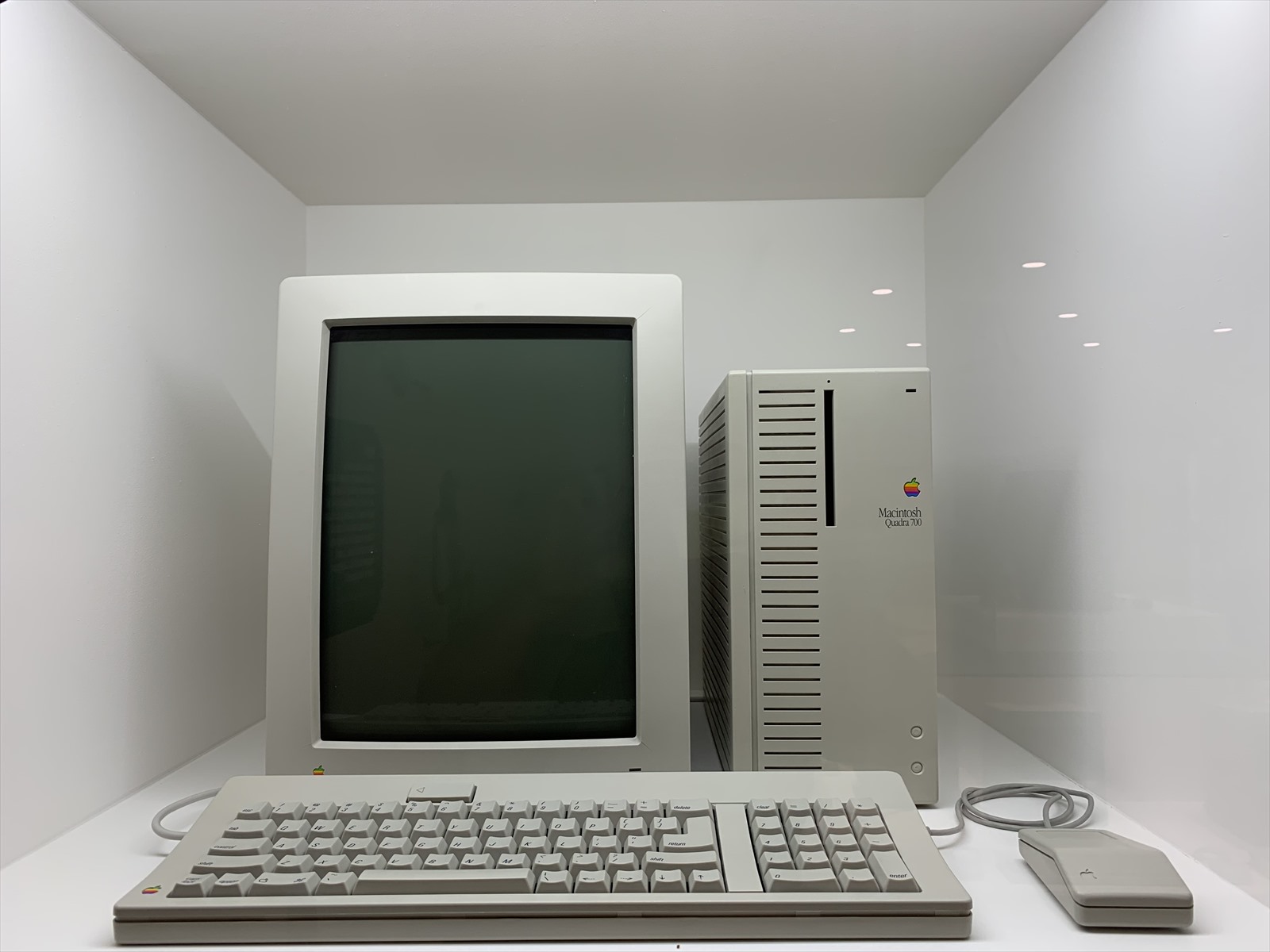
Back at headquarters, the desks held Macintosh Quadras alongside Silicon Graphics workstations. The Quadra 700, introduced in 1991, paired a 25 MHz Motorola 68040 processor with built-in Ethernet. It was a high-end desktop that could plausibly sit at the center of a networked operation, not a painted plastic box pretending to be one.
The SGI machines were the more exotic visitors. Contemporary production reporting names Indigo Elan and IRIS Crimson systems on the set. SGI specialized in three-dimensional graphics, and its machines ran IRIX, the company’s Unix operating system. Sanglard’s scene study supplies more precise placements, but a visible case does not prove its exact internal configuration—or that an actor was driving every picture on its monitor.
fsn was real, although it never ruled the desktop
Lex’s glowing landscape of towers and corridors was not invented by a prop department. Silicon Graphics described fsn as a three-dimensional navigator for the IRIX file system and explicitly noted its appearance in Jurassic Park. It turned folders and files into shapes that a user could travel around, making ordinary directory browsing look like a flight through a tiny city.
That does not mean Unix users spent the 1990s swooping through neon folders. SGI called fsn a prototype and an experiment, not a complete commercial product. The scene is accurate in the most entertaining possible way: Lex recognizes the operating environment, then encounters an unusual interface that really did exist. Hollywood selected the flashy edge case, but it did not simply fabricate one.
Movie myth / hardware fact
The screen was not a generic Hollywood invention. It was SGI’s experimental
fsn. But prototype software running on real machines still does not prove that every nearby keyboard drove every display live; contemporary accounts describe more than one screen workflow.
Four clues for separating production-confirmed hardware from later frame-by-frame identification.
PowerBook 100
The 1993 report confirms a PowerBook; Sanglard identifies the compact trailer laptop as the 100 model.
Quadra 700
Real control-room Quadras are production-confirmed. Apple records a 25 MHz 68040 and built-in Ethernet.
SGI Indigo / Crimson
Production reporting names both SGI families. Sanglard’s closer model-to-shot matches remain attributed analysis.
fsn / CM-5 context
fsn was real prototype software. The red-lit background included a loaned CM-5 shell, not proof of a live supercomputer.
Those red lights came with an important asterisk
The control room’s blinking red cabinets evoke the Thinking Machines Connection Machine 5, one of the era’s most recognizable supercomputer designs. A working CM-5 was a parallel system built from many processing nodes; NCAR’s 32-node “Littlebear,” received in 1993, ran a Sun-based Unix environment.
But the machines behind the actors should not be promoted to full supercomputer status. The contemporary report describes a CM-5 shell loaned to the production. That makes the silhouette authentic while leaving the computing power offstage. It is a perfect bit of set dressing: real industrial design, carefully deployed, without pretending the entire installation was calculating dinosaur logistics between takes.
Real hardware, two accounts of how the screens worked
The uncontested point is that at least some display imagery came from systems positioned behind or beside the set, not necessarily from the chassis under each monitor. The Post reported that SGIs behind the Los Angeles set generated displays in real time in response to instructions actors typed on the keyboards. A making-of account quoted by Sanglard offers a different production detail: animations prepared over six months were routed by adjacent operators responding to radio cues.
The sources do not show whether those accounts describe different scenes or workflows, so we cannot flatten them into one system. Both reveal clever filmmaking: actors performed amid real contemporary gear while specialists out of frame helped the displays hit their dramatic beats. That is subtler than saying every keyboard drove its nearby workstation—and more interesting than dismissing every screen as canned playback.
The set computers and the dinosaur computers had different jobs
One more boundary matters. The Macs and SGIs seen inside the fictional park belong to the set story. Industrial Light & Magic also used Silicon Graphics systems in the separate effects pipeline that helped create the dinosaurs. The two groups share a manufacturer and a moment in computing history, but they are not interchangeable. One sold the illusion of a technologically ambitious park; the other helped manufacture the creatures threatening it.
That distinction is why the computer scenes still reward close viewing. They are neither a documentary inventory nor a random wall of blinking props. They capture a brief era when graphical workstations, networked Macs, experimental interfaces, and supercomputer styling all looked like a plausible route to the future. The park failed spectacularly, but its computer department had excellent taste.
Primary sources and further reading
- Mike Langberg, “Going Out for a Byte in ‘Jurassic Park’”, The Washington Post (1993)
- Fabien Sanglard’s frame-by-frame hardware study (2026)
- Apple: Macintosh PowerBook 100 technical specifications
- Apple: Macintosh Quadra 700 technical specifications
- IRIX Network: SGI Indigo history and SGI Crimson history
- Archived Silicon Graphics page for
fsn - NCAR: Connection Machine 5 “Littlebear”
- Computer History Museum: Silicon Graphics